Managing Remote Support for Your Small Business
Organize devices, support roles, branch workflows, and request records. Build a practical remote-support process your small business can maintain.
GoMyid ·
Remote support gets harder to manage before a business feels large. Two people who once recognized every computer may suddenly be covering a second office, new employees, and a mixture of shared and personal workstations. The connection tool still works, but the surrounding questions become less obvious: which device belongs to this request, who can support it, and where was the last fix recorded?
A small business does not need a complicated service-management program to answer those questions. It needs a clear way to receive requests, identify devices, assign responsibility, complete work, and remove access when it is no longer needed. This guide explains that operating model using GoMyid's remote-support and device-management views as examples. The goal is a process that another person can follow without depending on one technician's memory.
Work a support request through the GoMyid queue
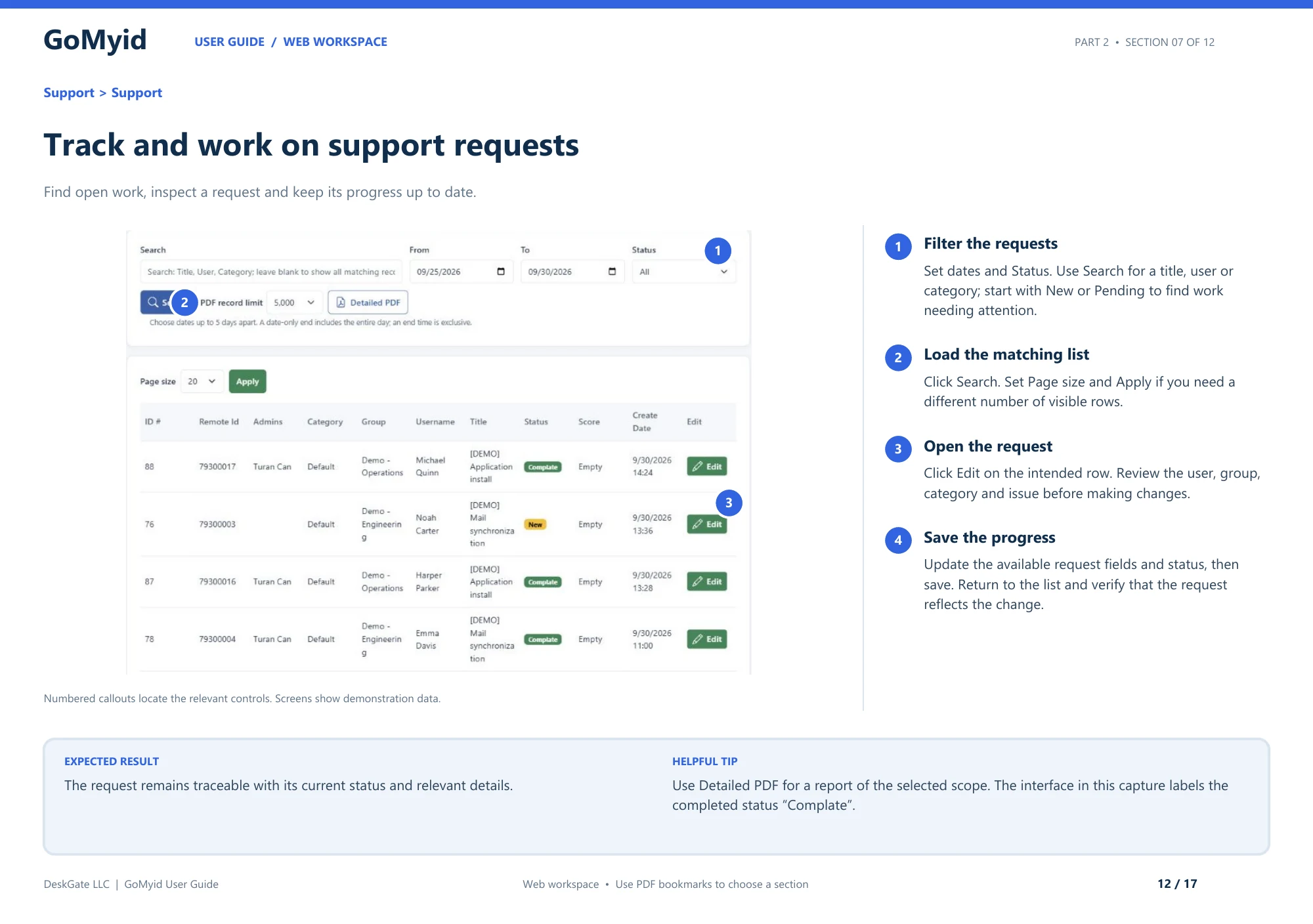
The documented queue gives a small team a shared place to find work and confirm progress. Use the request record to keep the issue tied to its user and group instead of relying only on a chat message and a remembered device ID.
- Open Support > Support and set the dates and Status. Start with New or Pending when looking for work that needs attention.
- Use Search for a title, user, or category and click Search.
- If needed, choose a different Page size and click Apply.
- Click Edit on the intended request. Review the user, group, category, and issue before changing its available fields or status.
- Save, return to the list, and verify that the request reflects the update.
The captured guide labels the completed status Complate. Recognize that label when following the illustration, while using the wording in your installed interface. The expected result is a traceable request with its current status and relevant details. It is not enough to finish the remote session and leave the shared queue showing that nobody has handled the work.
Define what your support service covers
Begin with the devices and tasks your team is responsible for. Does support cover office workstations, employee laptops, branch computers, or a limited set of business applications? Write the scope in ordinary language. If personal devices are outside the arrangement, say so clearly before a request arrives. Ambiguous boundaries create awkward decisions during an already stressful problem.
List the types of help you expect to provide remotely. Application settings, ordinary document issues, and some device checks may fit well. Hardware replacement and physical network problems may require someone on site. A remote-support process should identify that boundary instead of treating every unsuccessful remote fix as a technician failure.
Agree on when help is available and what counts as an urgent interruption. A small team can be responsive without promising that every request receives immediate attention. Clear expectations help employees choose the right channel and give technicians room to finish existing work. The process should reflect actual staffing, not a service level borrowed from a much larger organization.
Build a device directory people can trust
A useful device record answers basic questions quickly: what is this computer, where is it used, and who is responsible for it? Choose names that make sense to more than one person. A nickname that only the original installer recognizes is a weak foundation for a growing support team. Location and role can provide helpful context when used consistently.
Do not confuse a directory entry with current availability. A known device can be asleep, disconnected, or waiting for local attention. Before a session, confirm enough context to identify the intended destination and determine whether it is ready. For troubleshooting that distinction, see the availability checklist.
Give the directory an owner. Someone should review duplicate-looking entries, obsolete devices, and unclear names. This does not need to become a large administrative job. Small corrections made when equipment changes hands are easier than a major cleanup after the team has lost confidence in the list.
Assign support roles and device scope together
Decide who can perform each kind of work and which computers they support. A person helping one branch may not need access to every office. A technician who transfers documents may not need every administrative capability. GoMyid's product overview shows administrator permissions and group assignments, which are useful controls when they reflect real responsibilities.
Use named responsibility rather than an informal shared identity where the deployment supports individual administration. A support record should make it possible to understand who handled a request and who owns follow-up. The point is continuity and accountability, not making ordinary help difficult. Clear ownership makes it easier to hand work to someone else when a technician is unavailable.
Review access when roles change. A temporary assignment should not quietly become permanent because nobody remembered to remove it. Include remote access in employee departures, team transfers, and contractor offboarding. The managed-permission guide explains how capability and device scope work together.
Give employees one clear way to ask for help
A request should identify the person, device, task, and observed problem. Keep the form or message format short enough that employees will actually use it. Ask what they were trying to do, what happened instead, and whether work is blocked. A screenshot can help when it shows the relevant error without exposing unrelated private information.
Avoid requiring employees to diagnose the technical cause before they can ask for support. They may describe symptoms in everyday language, and that is acceptable. The technician's job is to turn those observations into a focused investigation. A useful intake process collects context without making the user guess whether the problem belongs to networking, the operating system, or an application.
Use a recognizable support channel so people can distinguish a legitimate request from an unexpected caller. Tell employees how a technician will contact them and what information may be requested. Consistency helps both usability and access verification. A process that changes with every technician makes it harder for users to know when something is unusual.
Prioritize by business effect, not by message volume
Ask what work is affected and how many people are blocked. A single workstation issue can be urgent if it stops a critical task, while several minor questions may be scheduled. Keep the decision tied to the actual consequence. The loudest message or most senior sender should not be the only signal that determines the queue.
Separate temporary workarounds from completed fixes. If an employee can continue through an approved alternate process, record that improvement without declaring the underlying issue resolved. This gives the team room to investigate while preserving an accurate view of what remains. It also prevents the same workaround from being rediscovered on every shift.
When two requests conflict, explain the next step and expected contact rather than leaving one person guessing. Small teams cannot eliminate every delay, but they can make the delay understandable. A concise status update often reduces duplicate messages and lets the technician focus on the current task.
Use a consistent remote-session opening
Confirm the request and destination, explain the intended work, and establish how the employee can pause the session. Ask them to save relevant work and close unrelated material where practical. Then connect using the appropriate mode and verify the desktop before making changes. These steps take little time once they become routine.
GoMyid's Windows client distinguishes Full control, File transfer, and Command modes. Choose the workflow that fits the task. A technician should be able to explain why they need the selected capability. If the request expands into another kind of work, discuss the change instead of treating the original connection as permission for everything that becomes visible.
For the exact first-session sequence, use the connection walkthrough. Train the team to perform the same destination and completion checks even when they are experienced enough to connect quickly. Familiarity should reduce confusion, not remove the checks that keep the work tied to the right device.
Keep records that help the next technician
A useful support note describes the original problem, the relevant device, the change made, and the result the user verified. It does not need to reproduce every mouse click. The next technician should be able to understand what happened without calling the original operator or reading a long transcript of unrelated observations.
Separate facts from theories. "The application opened after this setting was corrected" is different from "the network caused everything." Record uncertainty when it remains. If a problem returns, an accurate note gives the next investigation a better starting point than a confident but unsupported conclusion.
Include follow-up ownership and any continuing access arrangement. If a vendor needs to review an error, name who will contact them. If the user is using a temporary workaround, state what remains unresolved. Keep credentials and private documents out of routine notes; the record should explain the work without becoming an unnecessary store of sensitive information.
Adapt the process for branches and distributed offices
Each location needs a recognizable contact who can help with physical tasks when necessary. Remote support cannot reconnect a loose cable or confirm whether a power strip is switched off without someone on site. Establish that fallback before an outage. The contact does not need to be a technician, but they should know how to communicate observations accurately.
Organize devices so the branch context is visible. A workstation called Reception in two offices should not be ambiguous to the support team. Use the directory and groups consistently, and confirm the location during intake. This reduces the chance of reaching a familiar-looking but unrelated machine during a busy support period.
Consider each branch's actual working conditions. Connectivity, available local staff, and business hours can differ. A pilot at headquarters does not prove that every location will have the same experience. Test a representative remote task at a branch and record any practical limitations. Use that evidence to plan support rather than assuming all offices behave alike.
Standardize file-transfer handoffs
When support requires moving a file, identify the source, destination, and reason for the copy. Agree on how the recipient will recognize the correct version. A file called Final on a technician's desktop is not a reliable long-term handoff. Use the business's normal naming and storage conventions when they exist.
Verify the result at the destination and record only the relevant outcome. If a temporary copy was needed for diagnosis, decide where it should be retained or removed after the task. Ending the remote session does not remove that copy automatically. The transfer verification guide provides a practical sequence.
Avoid letting support devices become informal document archives. Over time, convenient local folders can collect old configurations, private files, and unclear versions. Keep necessary material in the intended business location with an owner. That makes support continuity easier and reduces the confusion that appears when a technician changes computers.
Decide which work can be handled from mobile
Mobile access can help an on-call person check a status or answer a narrow question without returning to a desk. It is less comfortable for long typing, detailed file comparisons, or complex administrative changes. Define a reasonable boundary for mobile work so technicians do not feel obligated to perform every task from a phone.
GoMyid's Android overview shows a connection hub, landscape sessions, and touch and keyboard controls. Test the tasks your team actually expects to perform with those controls. A feature being available does not prove that it is the best choice under time pressure. Accuracy and a clear result should guide the decision.
Keep the same access and documentation practices used on a computer. A quick mobile session still needs the correct destination, an agreed task, and an ending. For practical input advice, see the mobile support routine. A short, repeatable process makes mobile help more dependable.
Choose the operating model your team can maintain
Cloud and self-hosted arrangements distribute responsibilities differently. A self-hosted deployment can give your organization more direct control over its infrastructure, but it also requires people to maintain and recover it. Evaluate those responsibilities alongside the client experience. A successful connection is only one part of running a support platform over time.
List who owns the server environment, updates, backup verification, and incident response for the arrangement you choose. If those responsibilities do not have clear owners, resolve that gap before expanding the rollout. A small business can use sophisticated tools, but it should not depend on undocumented infrastructure work by one person who may be unavailable.
Review GoMyid's self-hosted information and the deployment ownership guide when considering that path. Confirm current offering and configuration details directly rather than assuming that every feature shown in a product overview belongs to every deployment.
Measure whether support is helping
Start with measures that answer operational questions: how many requests remain open, which problems recur, and whether employees can complete the original task after support. A connection count alone does not show whether work was useful. A short session may solve a simple issue, while a longer session may reflect a legitimate complex problem.
Read measures with context. If one branch produces more requests, it may have more devices, a recent rollout, or a difficult application. Do not turn a raw total into a judgment about employees or technicians without understanding the work behind it. Use the information to identify improvements and training needs.
Review recurring issues together and choose one practical change at a time. A clearer setup guide, a corrected device record, or a consistent file destination may eliminate repeated confusion. The goal is less avoidable work, not a dashboard full of numbers that nobody uses to make a decision.
A manageable first-month rollout
Begin with a small, authorized group of devices and a few representative tasks. Confirm the directory, operator scope, request channel, and session-ending process. Ask both technicians and employees where the instructions are unclear. Fix those points before enrolling more people. A narrow pilot is valuable because its lessons can be applied quickly.
Next, expand to a location or team with slightly different conditions. Test a real support task, a file handoff, and a normal access-removal event. Keep the result documented without adding unnecessary demonstration records to production. You are validating the operating process, not trying to create an impressive volume of activity.
At the end of the first month, review ownership and unresolved questions. Confirm that another person can continue the work if the original technician is absent. A successful rollout leaves the business with a usable process and maintained records, not just installed software. Adjust the scope as the team gains reliable experience.
Turn repeat requests into useful guidance
When the same question appears several times, look for a small improvement to the user-facing instructions. A screenshot showing the correct download location or a short explanation of a common application setting may prevent another call. Write the guidance around the employee's task rather than the technician's internal terminology, and have someone unfamiliar with the issue try it.
Keep a clear route back to support. A guide should help people complete a familiar task, not leave them stranded when their screen differs. State when to stop and ask for help. Review the instructions when the application or business process changes, and retire advice that no longer matches the environment. A modest collection of accurate answers is more useful than a large library of outdated fixes.
Frequently asked questions
Is device management useful for a very small team?
It can be, especially when devices are shared, spread across locations, or supported by more than one person. The benefit comes from reliable identity and ownership rather than a particular device count. Start with a simple directory and clear responsibilities, then use the management capabilities that solve an actual problem in your environment.
Does free remote access include every business-management feature?
Do not assume that individual remote access and centralized management have identical terms or availability. Review the current GoMyid offering for the functions your business needs. The free-use evaluation guide separates session terms from broader management and deployment decisions.
Do we need a full-time IT technician to start?
Not necessarily, but every responsibility still needs an owner. Decide who approves access, handles requests, maintains device records, and escalates problems beyond the team's skills. If outside support is involved, define its scope and how access ends. A part-time arrangement works better when its boundaries are explicit.
How should we handle urgent requests?
Use the business effect to prioritize the request and make the escalation path clear. Confirm who is blocked and whether an approved workaround exists. Urgency should shorten unnecessary delay, not remove identity and destination checks. A hurried connection to the wrong computer creates more work instead of restoring service.
Should we record every detail of a session?
Keep the information needed to understand the task, changes, result, and follow-up. Avoid collecting unrelated private material just to make the record look complete. Use the deployment's available records appropriately and follow the organization's handling rules. A concise, accurate note is often more useful than a large collection nobody reviews.
What should we set up first?
Start with device identity, support ownership, and a recognizable request channel. Then validate one complete remote-support task, including its ending. The request-verification guide and software evaluation checklist provide practical starting points for that first controlled rollout.
Interface reference: GoMyid User Guide, page 12: Track and work on support requests. This article uses the documented example interface; it does not report a live deployment test.