Planning a Self-Hosted Remote Desktop Deployment
Plan a GoMyid self-hosted deployment with clear ownership, device scope, a limited pilot, maintenance responsibilities, and recovery verification.
GoMyid ·
Self-hosted remote desktop changes who is responsible for the service behind a connection. Instead of considering only the client application, your organization also needs to plan the environment that keeps access available. That includes ownership, deployment configuration, maintenance, recovery, and the process people follow when something stops working. The benefit of more direct control comes with work that must have a clear home.
This guide is a planning companion for organizations considering GoMyid's self-hosted offering. It is not an installation recipe and does not substitute for the current product requirements. It helps you decide what to verify before deployment, how to structure a limited pilot, and which operating questions to answer before depending on the platform for everyday support.
Check the Android connection source during a self-hosted pilot
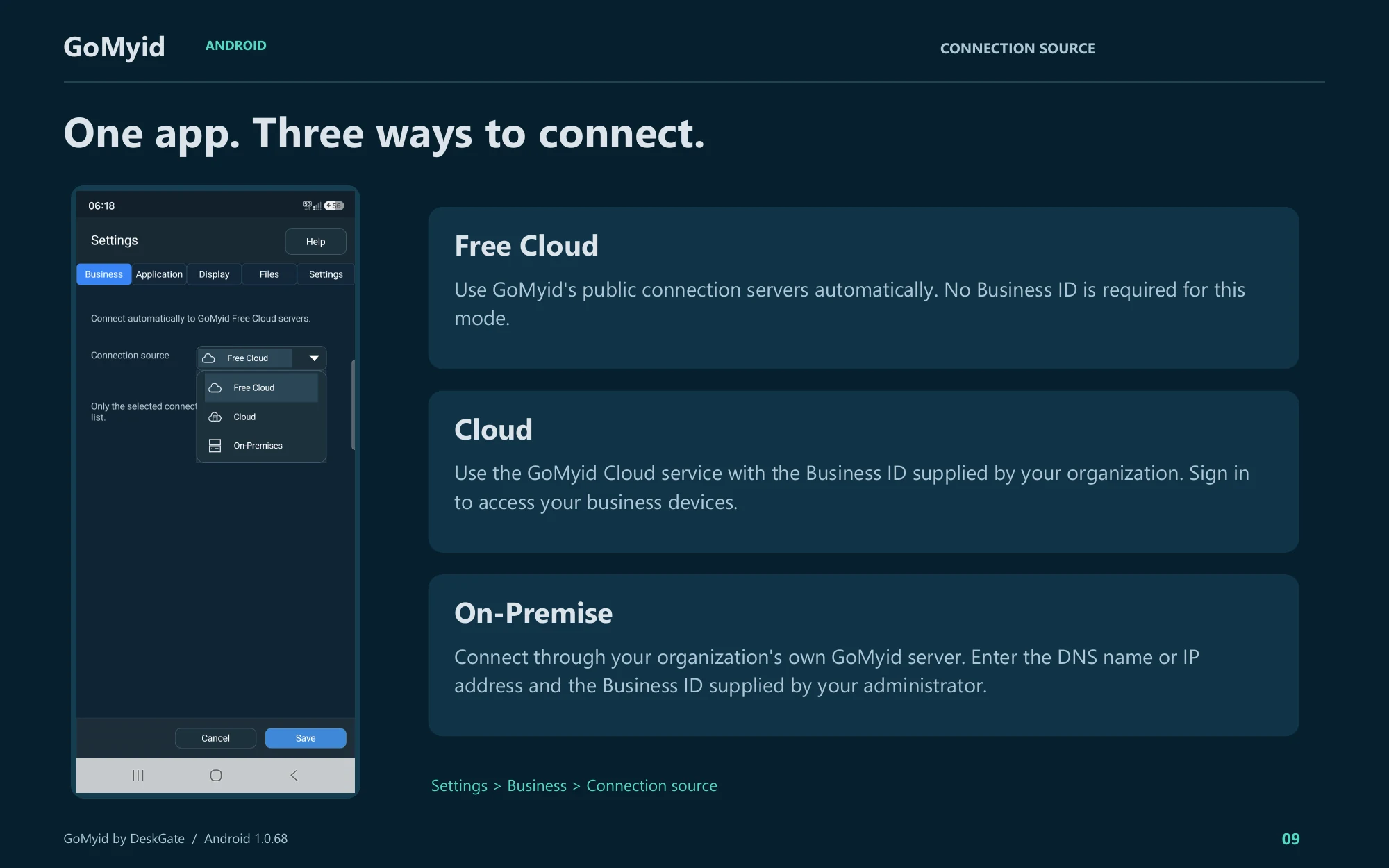
Before treating a mobile pilot failure as a server outage, check which service the Android app is configured to use. The documented path is Settings > Business > Connection source. The three choices have different required information.
- Free Cloud: uses GoMyid's public connection servers automatically. The guide states that no Business ID is required for this mode.
- Cloud: uses the GoMyid Cloud service with the Business ID supplied by the organization. Sign in to access business devices.
- On-Premise: uses the organization's own GoMyid server. Enter the DNS name or IP address and the Business ID supplied by the administrator.
For an on-premises pilot, obtain those values from the deployment owner rather than copying the example illustration. Check the selected source before diagnosing a missing business-device list. A saved local shortcut and an organizational device directory are different things: the Android guide says the local list does not display online/offline status, while the business list uses green and gray status dots. Record which source and list you verified so another technician can reproduce the same check. This is a client-configuration step, not a substitute for installing or validating the server itself.
What does self-hosted remote desktop mean?
In a self-hosted arrangement, your organization operates the relevant service infrastructure in an environment it manages or has arranged to manage. The exact components and responsibilities depend on the product and deployment. Do not infer the full architecture from the phrase alone. Review the actual GoMyid installation guidance and confirm how the clients, management functions, and supporting services fit together.
Self-hosted and on-premises are related terms, but they are not always identical descriptions. On-premises usually refers to infrastructure at an organization's location. Self-hosting emphasizes who operates the service and may involve another controlled hosting environment. Use precise language in your plan so everybody understands where the system runs and who is responsible for it.
The practical question is not whether one label sounds more secure or professional. It is whether the arrangement meets your requirements and whether your team can maintain it. A well-understood operating model is more valuable than an architecture chosen for a label. Start with the work and responsibilities, then confirm the technical design that supports them.
Why might an organization consider self-hosting?
Some organizations need direct control over deployment decisions, infrastructure administration, or the way a service fits into existing operations. Others want a defined environment for their support team and managed devices. Those are useful requirements to discuss, but they need to be written in concrete terms. "We want control" is not enough to decide what must be deployed or maintained.
List the decisions you actually need to own. Examples might include scheduling maintenance, choosing the managed environment, assigning operational responsibility, or coordinating recovery with other internal services. Then ask whether the proposed GoMyid arrangement gives you the relevant control and what obligations come with it. Confirm availability through current product information rather than assumptions.
Also consider reasons to keep the operating model simpler. If the team has no clear infrastructure owner or cannot support maintenance and recovery, self-hosting may create a dependency it is not ready to manage. That does not rule out remote access. It means the deployment choice should match the organization's capabilities as well as its preferences.
Assign ownership before installation
Name the person or team responsible for the service environment, the application configuration, and day-to-day support. These can be different responsibilities, but the handoffs must be clear. If users report a failed connection, somebody should know whether to investigate the client, the managed device, or the supporting environment without guessing who owns the problem.
Define who can approve changes and who can perform them. A technician who supports endpoints does not necessarily need authority over every infrastructure setting. Keep responsibilities aligned with the work. When an external provider is involved, document which tasks it handles and how your organization requests or verifies those tasks.
Plan for absence. Another authorized person should be able to find the current deployment information and continue essential operations if the primary owner is unavailable. Store that information in the approved administrative location, not only in a personal notebook or a chat thread. Keep credentials in the organization's appropriate secure process rather than embedding them in a general runbook.
Confirm current requirements from the product guidance
Use the current GoMyid self-hosted information and installation material to establish the supported environment. Confirm the required components, supported versions, and configuration responsibilities for the offering you are actually deploying. A product overview is useful for understanding workflows, but it is not a complete dependency or installation specification.
Avoid carrying over settings from another remote desktop product. Familiar port numbers, account assumptions, or Windows configuration steps may be unrelated to GoMyid's architecture. Copying them can create unnecessary exposure or simply make troubleshooting harder. Build the deployment checklist from the relevant documentation and your environment's approved standards.
Record the versions and configuration decisions that matter for support. That gives you a baseline when behavior changes after an update or environment change. Keep the record concise enough to maintain. A detailed document that becomes stale immediately is less useful than a current list of the components, owners, and decisions needed to operate the system.
Design access around people and device groups
Before adding many computers, decide how the support team should identify and reach them. GoMyid's management overview shows device groups, station records, administrator capabilities, and page permissions. Those controls are useful when the group structure reflects real operational boundaries, such as teams or locations that have different support responsibilities.
Choose group names that other administrators can understand. Avoid using a structure that depends on one person's private shorthand. Plan how devices move between groups when employees or offices change. A deployment is not static, and the access model should make normal reassignment possible without losing track of ownership.
Review capability and scope together. A technician needs the appropriate action permissions for the right devices, not simply one broad role that happens to make every test succeed. The managed-access guide explains this relationship. Validate the intended behavior with a limited authorized group before expanding access.
Plan endpoint enrollment and identification
Decide which devices belong in the first rollout and how each one will be identified. Keep the initial group small enough that you can verify every record against a real computer. Include enough variation to represent ordinary work, such as a standard workstation and a device at a second location, without turning the pilot into a full deployment immediately.
Coordinate installation or configuration through the approved endpoint process. Employees should know what is changing, how to request support, and what access arrangement applies to their device. Do not assume that installing a client is the whole onboarding task. Device ownership, support scope, and user expectations should be established at the same time.
Plan removal as part of enrollment. A retired or reassigned computer should not remain indefinitely in an unclear state. Decide who updates the record and reviews continuing access. The device-directory guide offers a practical approach to maintaining that context as the environment grows.
Coordinate network and identity decisions
Review the product's documented connection requirements with the people responsible for the environment. Identify the intended connection paths and the administrative boundaries involved. Make the requirements explicit instead of opening broad access and hoping to narrow it later. A deployment should have a reason for each required connection.
Keep names, addresses, and identity-related configuration consistent with the approved design. If the environment uses certificates or other transport configuration, assign ownership for their maintenance as part of the deployment. Do not treat the first successful connection as proof that these details will remain correct indefinitely. Some configuration has a lifecycle that extends beyond installation day.
Test from the actual locations and device types you expect to support. A connection inside one office does not demonstrate every remote path. Record where the pilot was tested and where it was not. This keeps later decisions grounded in evidence rather than a general statement that the system "works everywhere."
Plan recovery before the service becomes essential
Identify what needs to be recoverable in the chosen deployment. That may include application configuration, required data, and other components defined by the product and your operating model. Use the current installation and operational guidance to determine the actual scope. Do not assume that copying one visible folder captures the complete state of a service.
Assign responsibility for backup operation and restore verification. A backup job reporting success is useful, but it does not by itself prove that the service can be restored into a working state. Plan a controlled recovery check appropriate to the environment. Keep it separate from customer-facing work so verification does not create an avoidable outage.
Define the human part of recovery as well. Who decides that a restore is needed, who performs it, and who verifies endpoint access afterward? How will users receive updates if the normal support path depends on the affected system? A recovery plan should explain the next action under pressure rather than merely list technologies.
Give updates and maintenance a predictable process
Choose a maintenance owner and a communication method. Before a change, record the current state and the intended result. Identify whether users may lose access temporarily and what work needs to be saved or rescheduled. A small amount of coordination can prevent a planned update from looking like an unexplained outage to the support team.
Use the product's supported update process and review the relevant compatibility requirements. Do not combine unrelated changes simply because the environment is already being maintained. Updating several components at once can make a failure harder to diagnose. A focused change gives you a clearer way to verify the result and decide whether recovery is needed.
After maintenance, repeat a representative support workflow. Confirm that the intended administrator can reach the intended device and complete the expected action. Check more than the presence of a login page or a running process. The useful result is the working service that people depend on, not just evidence that one component started.
Run a pilot that answers operational questions
Choose a few tasks that represent normal use: a desktop support session, an approved file transfer, and finding a device through the management directory. Include the people who will receive support as well as the operators who will provide it. Ask where the workflow is confusing and which instructions need clarification.
Test the ending of the work. Disconnect, verify the result with the user, and review whether access should remain. Include a normal responsibility change so you know how device scope is updated. A pilot that only proves administrators can connect misses the equally important question of whether access can be maintained and removed correctly.
Keep a short record of the conditions tested, observed limitations, and unresolved requirements. Do not fill the production environment with unnecessary demonstration records. The goal is evidence for a rollout decision. For a broader evaluation structure, use the remote desktop software checklist.
Decide what you need to observe during normal operation
Choose a small set of signals that tell you whether the service and support process are working. Depending on the deployment, these may include connection outcomes, login events, or administrative changes available in the management workspace. Confirm what is actually recorded and how the responsible people will review it.
Give each reviewed signal a purpose. A recurring connection failure should lead to a defined investigation, not simply a number in a report. An administrative change should be understandable in the context of an approved task. Avoid collecting or exporting broad information without knowing what question it is supposed to answer.
Keep time and scope consistent when investigating. A support request from one branch should be compared with the relevant device and period, not an unrelated aggregate. The troubleshooting handoff guide explains the information that helps an investigation move forward without turning guesses into conclusions.
Prepare a runbook for the people on call
A useful runbook begins with the service purpose, responsible contacts, and the first checks for a reported failure. It should identify the approved support channel and where current deployment information is maintained. Keep the ordinary steps easy to find. A document that requires reading an entire installation history before taking action is difficult to use during an interruption.
Separate common observations from consequential actions. Checking whether a destination is available is different from restarting a service or restoring data. State who can authorize and perform the latter actions. Include the expected verification after a change so the operator knows how to recognize a successful result.
Review the runbook with someone who did not build the system. Their questions reveal assumptions that the original installer may not notice. Update it after meaningful changes and real incidents. The aim is continuity: another authorized person should be able to understand the current environment and make the appropriate next decision.
Decide whether the deployment is ready to expand
Review the pilot against the original requirements. Which tasks worked, which locations were tested, and which responsibilities remain unassigned? Be specific about gaps. A successful desktop connection is not enough if recovery ownership or routine maintenance remains unclear. Resolve important operational uncertainty before adding devices that will depend on the system.
Expand in manageable groups and keep a way to identify new issues. A staged rollout makes it easier to distinguish a location-specific problem from a general deployment change. Communicate what employees should expect and how they should ask for help. The support process should be ready when the clients become available, not invented afterward.
Once the system is in routine use, revisit the plan when the business changes. New locations, different device types, or a new support provider may alter the operating requirements. Self-hosting is an ongoing responsibility rather than a one-time installation milestone. Keep the ownership and verification practices as current as the software itself.
Keep an exit and transition plan
Think about how the organization would change the deployment later. A server may be replaced, a support provider may change, or the business may choose a different operating arrangement. Identify which records and configuration information need an owner during that transition. Use the product's supported procedures and avoid treating a move as an improvised copy of whatever files happen to be visible.
Include endpoint communication and access review in the transition. Users should know what changes, who will support them afterward, and how to recognize the legitimate connection process. Administrators should verify that obsolete access is removed through the appropriate controls. Planning for change while the system is healthy is easier than discovering these responsibilities during a rushed migration or an unexpected outage.
Frequently asked questions
Is self-hosted remote desktop automatically more secure?
No deployment label guarantees an outcome. The actual architecture, configuration, access controls, maintenance, and operating practices matter. Self-hosting changes responsibilities and may provide control relevant to your requirements, but those responsibilities still need to be carried out. Evaluate the environment you will actually operate rather than treating the label as evidence by itself.
Can this article replace the installation guide?
No. It is a planning guide for ownership, pilot design, maintenance, and recovery. Use GoMyid's current installation material for supported components and technical requirements. Avoid applying generic remote desktop settings from another product. Planning and installation complement each other, but they answer different questions.
Is self-hosting only for large organizations?
Organization size is not the only consideration. A small company may have clear infrastructure ownership and a reason to operate the service, while a larger company may prefer another arrangement. Evaluate the requirements, available skills, and continuing workload. The small-business operating-model section provides another perspective.
How long should the pilot last?
Long enough to test the important workflows and ordinary operating events you intend to rely on. A fixed number of days is less useful than a clear list of questions answered. Include representative locations, access changes, and post-maintenance verification where relevant. Finish with documented results and owners for any remaining work.
What is commonly overlooked after a successful installation?
The ongoing human responsibilities: who handles updates, who verifies recovery, who maintains device assignments, and who responds when access fails. Installation can be completed by one knowledgeable person, but routine operation needs continuity. Make those responsibilities visible before the service becomes essential to the team's support work.
What should we do first if we are considering GoMyid self-hosting?
Write down the reason for self-hosting and name the operational owner. Then review the current product requirements and plan a limited authorized pilot. Use the access-scope guide and the team file-transfer workflow to include complete support tasks in that pilot rather than checking only whether a login succeeds.
Interface reference: GoMyid Android Product Guide, version 1.0.68, September 2026, page 9. This article uses the documented example interface; it does not report a live deployment test.